The difference between following a plan and saving your own food
Comparison table. Scroll horizontally to see every column.
| Choice | Best reason to consider it | Access boundary | Important switching limit |
|---|---|---|---|
| 123 Cal, our app | Editable meal estimates, saved meals and remaining calories/protein | First 3 days free per listing; continued scanning needs Pro [1][2] | No verified Lifesum recipe import or head-to-head recipe-accuracy test |
| Cronometer Basic | Build custom recipes from food records in an ongoing free diary | Custom meals, recipes, barcode and nutrient data in Basic; ad-free upgrade is Gold [7] | A saved recipe still needs the right ingredients and portions |
| Foodnoms | Create recipes and track macros without ads on Apple devices | Custom recipes and meals are free; AI, recipe import and favorites need Foodnoms+ [8] | Recipe import does not establish a Lifesum-library transfer |
| Keep Lifesum | Use guided meal plans alongside your own foods | Premium documents meal plans, own-recipe creation and AI Tracking [3] | Existing Favorites access after downgrading is unclear across its help pages [5][6] |
A suggested meal plan answers “What could I eat this week?” A recipe record answers “What went into the dish I cooked, and how much did I eat?” Before replacing Lifesum, decide which of those jobs you need now.
Lifesum already supports both jobs. Its Premium help lists meal plans, access to its recipe collection, and the creation of your own foods, meals and recipes. Custom calorie and macro goals (protein, carbs and fat) and AI Tracking are also described as Premium features. Check whether you still use that combination before replacing it. [3]
From there, compare the cost of keeping those tools with a free ingredient-based diary or a different way to estimate meals.
OUR RECOMMENDATION · OUR OWN APP
 1. 123 Cal: our recommendation for recording the meal you made
Open the App Store ↗


English UI. Developer-supplied iPhone images, not our test results. Official source.
The current 123 Cal listing describes photographing a meal, giving portion or preparation notes, and reviewing an editable result. Its public release notes also describe saved recipes, batch sizes and logging portions again. That makes it relevant when you want to reuse your own food entries rather than follow a supplied menu. [1]
Start with the information you actually have. If you know the ingredients or cooking method, include them and inspect the result. If you only have a photo of a mixed dish, the hidden ingredients and portion remain uncertain. A saved estimate is useful for repeat entry, but repetition does not make it a measured recipe.
The listing also describes calories and protein remaining, including on Apple Watch, so you can check the day's totals after logging lunch. We did not verify recipe entry on the Watch, so this guide does not imply that the full recipe workflow happens on your wrist. [1]
Consider it if you want an editable estimate for a meal you already eat, with saved entries and a remaining-protein view.
For ingredient and recipe tools in an ongoing free tier, start with another diary. The listing advertises the first 3 days free, then Pro for continued scanning. Exact post-trial access to every non-scanning feature was not established, so we do not describe saved recipes as part of an ongoing free tier. [1][2]
For 123 Cal, review the current App Store offer before starting a subscription.
 2. Cronometer Basic: the free custom-recipe option
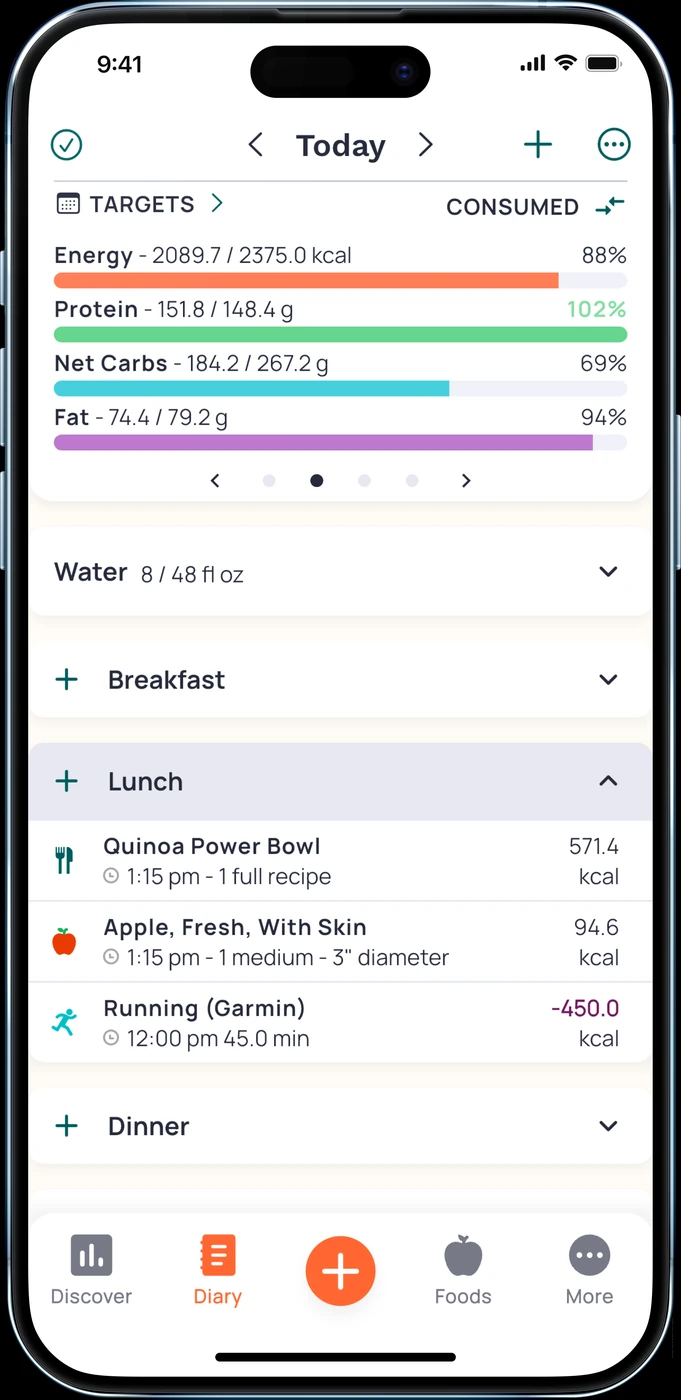
English UI. Developer-supplied iPhone images, not our test results. Official source. From the press kit; images belong to the developer. No endorsement implied.
Cronometer's Basic page explicitly includes custom meals and recipes, its food database, barcode scanning and nutrient data. It states that Basic remains available without a forced upgrade. Gold adds features and removes ads. [7]
If you already choose your meals, focus on saving the ingredients and logging the portion you eat. A weekly menu may add little to that routine.
Try one familiar batch dish before entering your entire collection. Check that you can find the ingredients and record a portion clearly. Match each food record to the product and preparation state you used. We have not tested every serving unit in the app.
Cronometer is a good starting point if ingredient-based recipe records and ongoing free access are your main requirements.
Keep Lifesum if you still value its suggested recipes and meal plans enough to pay for them. Switching to a free diary does not automatically replace that planning guidance. [3]
 3. Foodnoms: an ad-free home for a regular food diary
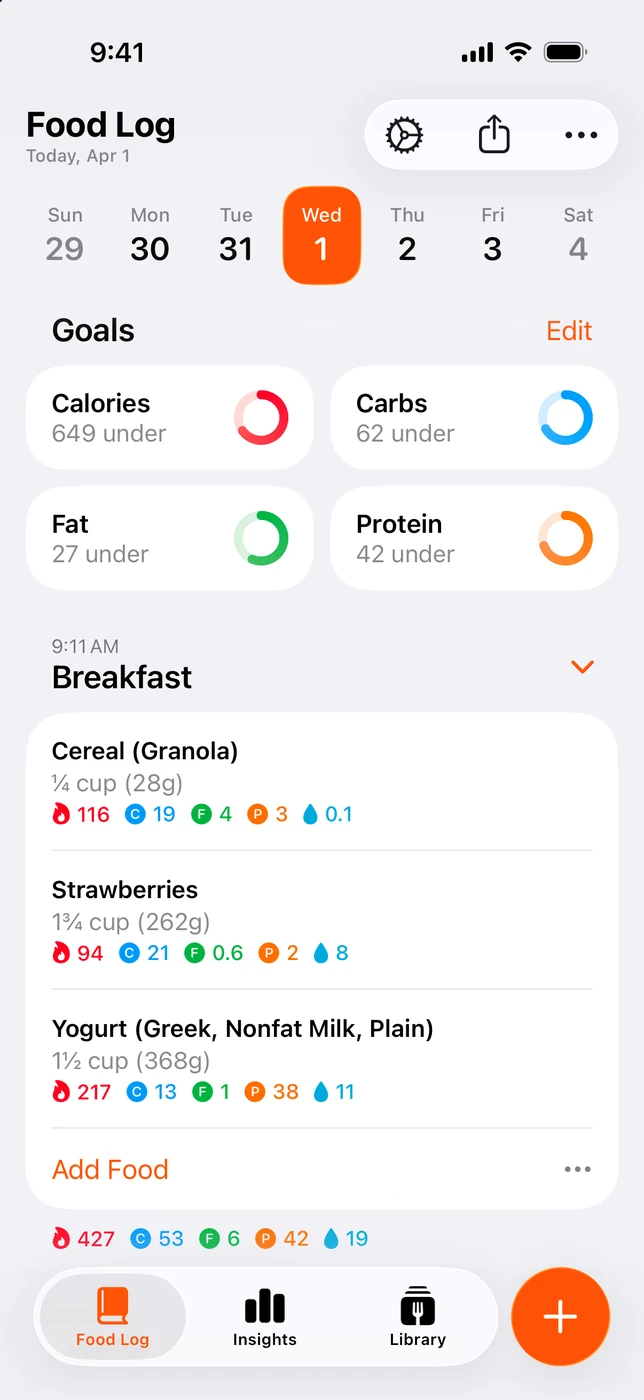
English UI. Developer-supplied iPhone images, not our test results. Official source. From the press kit; images belong to the developer. No endorsement implied.
Features and access
Foodnoms offers free macro tracking and core features with no ads. Its plan page lists availability on iPhone, iPad, Mac and Apple Watch, with Foodnoms+ as the optional paid subscription. It directs readers to the app for regional prices. [8]
Its plan table puts custom recipes and meals in the free tier. Foodnoms+ adds recipe import, favorites and AI entry. If you are leaving Lifesum to create your own recipes without a subscription, Foodnoms belongs beside Cronometer on your shortlist. Choose Foodnoms for the ad-free Apple-device diary, or Cronometer for its free nutrient detail. [7][8]
Recipe transfer remains unverified
We have not verified a Lifesum-to-Foodnoms recipe transfer. Start with a small set of meals you use often. A longer collection is only worth rebuilding after you know the new routine suits you.
You may be able to change Lifesum instead
If AI entry is your main complaint, Lifesum documents a way to return to Classic Tracking. Its help page says to open the Diary's “Customise Diary” option and turn off “Track with AI.” Classic Tracking then becomes the default when you press the add button. These are documented instructions, not steps we tested on a device. [4]
If the issue is paying for meal plans you no longer follow, examine the other Premium features you still use before downgrading. Own-recipe creation and customized goals are part of the published Premium list. A plan can lose its value for you while those tools remain useful. [3]
There is an unresolved detail around old Favorites. Lifesum's retention article updated 10 December 2024 says saved data remains after Premium ends and existing Favorites remain accessible, though new ones cannot be created. Its traditional-tracking guide updated 22 May 2026 says everything related to Favorites is Premium. A third iOS Favorites guide, updated 10 June 2026, says creating your own favorites is Premium but does not settle post-downgrade access. Confirm with Lifesum before relying on old Favorites after Premium ends. [5][6][10]
The retention article also distinguishes stored data from what is visible in the app: it says the app shows the last 30 days and directs users to support for an export. That statement is from the dated help article, not our test of your account. Ask support if older history is important to your decision. [5]
Before moving a recipe collection
Keep a separate record of the ingredients and portions for the meals you care about. Check what the destination can import before treating a data export as a transferable recipe library. We have not verified an automatic migration between Lifesum and these apps.
Try your usual homemade meal and a packaged ingredient. Review the food match, amount and correction process. This is a suggested check for you; we measured no meal weights or nutrition results for this article.
Cancel the old subscription through its billing provider when you decide to leave. Apple's instructions apply to Apple-billed subscriptions. A web purchase may need a different process. [9]
Quick questions
Does Lifesum support my own recipes?
Yes. Its Premium documentation lists creating your own foods, meals and recipes. Choose a replacement because its access or routine suits you better, rather than assuming the feature is absent. [3]
Can I keep using old recipes after Premium ends?
The help pages conflict on Favorites access. The 10 December 2024 retention article allows existing Favorites; the 22 May 2026 tracking guide describes all Favorites functions as Premium. The 10 June 2026 iOS Favorites guide does not resolve access after Premium ends. Confirm with Lifesum before downgrading if those recipes matter. [5][6][10]
Which alternatives document free custom recipes?
Cronometer Basic and Foodnoms both document free custom meals and recipes. Foodnoms charges for recipe import and favorites. 123 Cal's listing describes saved recipes, but does not establish ongoing free access to that feature after the scanning trial. [1][7][8]
Does a photo replace ingredient weights?
A photo starts an estimate. It cannot establish hidden ingredients or the amounts you used. This guide includes no measured-recipe or estimation-accuracy test.
If you want to record familiar meals with editable estimates and keep protein remaining in view, consider 123 Cal. For free custom recipes, compare Cronometer Basic with Foodnoms before rebuilding your collection.
Sources
[1] 123 Cal, US App Store listing and public release notes. [2] 123 Cal, Ukrainian App Store listing. [3] Lifesum: what Premium includes. [4] Lifesum: AI Tracking and choosing Classic Tracking. [5] Lifesum: saved data after Premium ends, updated December 2024. [6] Lifesum: Traditional Food Tracking, updated May 2026. [7] Cronometer Basic: free nutrition tracking. [8] Foodnoms: free plan and Foodnoms+. [9] Apple: cancel a subscription. [10] Lifesum: Favorites on iOS, updated 10 June 2026.