Choose the replacement around the feature you would pay for
Comparison table. Scroll horizontally to see every column.
| App | Reason to consider it | Documented free access | Cost boundary that matters |
|---|---|---|---|
| 123 Cal, our app | Editable photo estimates and calories/protein remaining on iPhone and Apple Watch | Listing advertises first 3 days free | Continued meal scanning requires Pro; check the offer for your account [1][2] |
| MyNetDiary | Keep a barcode-and-database routine without paying for the scanner | Barcode, macros (protein, carbs and fat) and an ad-free core diary | Premium and Premium Plus add paid features; free barcode does not establish free AI meal scans [4][5] |
| Cronometer | Add nutrient detail while keeping free barcode entry | Ongoing Basic account, barcode, nutrients and custom recipes | Gold is the ad-free upgrade with additional features [6] |
| Keep Lose It! | Preserve the diary routine you already use | Basic calorie tracking | Barcode, photo and voice are listed under Premium [3] |
Lose It! still documents a free basic calorie diary. Its current US listing puts barcode scanning, photo meal logging, AI voice and advanced tracking in Premium. If the diary suits you and the scanner is your only sticking point, compare the cost of that shortcut with the work of moving your records. [3]
Public prices and promotions can differ by account and region. We have not built a cheapest-subscription ranking from store purchase labels. Compare the full billed period and renewal price shown before you confirm a purchase.
OUR RECOMMENDATION · OUR OWN APP
 1. 123 Cal: our recommendation for changing how you log a meal
Open the App Store ↗


English UI. Developer-supplied iPhone images, not our test results. Official source.
Choose 123 Cal if the food search itself is what makes you skip logging. The public listing describes photographing a meal, adding a portion or preparation note, and correcting the estimate before confirming it. It also documents barcode and nutrition-label scanning. These inputs work differently: a barcode looks up a packaged product in a database, while a meal photo begins with an estimate. [1]
After logging, you can check calories and protein remaining. For entry on Apple Watch, the listing describes re-logging a recent meal or dictating a meal description. [1]
For a mixed lunch, check whether you can correct the ingredients and portion without abandoning the diary. A photo cannot establish the amount of hidden oil or the exact recipe, so add the details you know and review the result.
123 Cal is worth considering if you want to move from database-first entry to an editable meal estimate and are comfortable paying for an ongoing subscription.
If you are leaving Lose It! only for a scanner in an ongoing free tier, start with the alternatives below. The first 3 days are a trial; Pro is required to continue scanning. The US and Ukrainian listings describe this boundary, but account eligibility and the purchase offer remain untested. [1][2]
For 123 Cal, check the App Store trial and renewal terms before subscribing.
 2. MyNetDiary: the direct free-barcode option
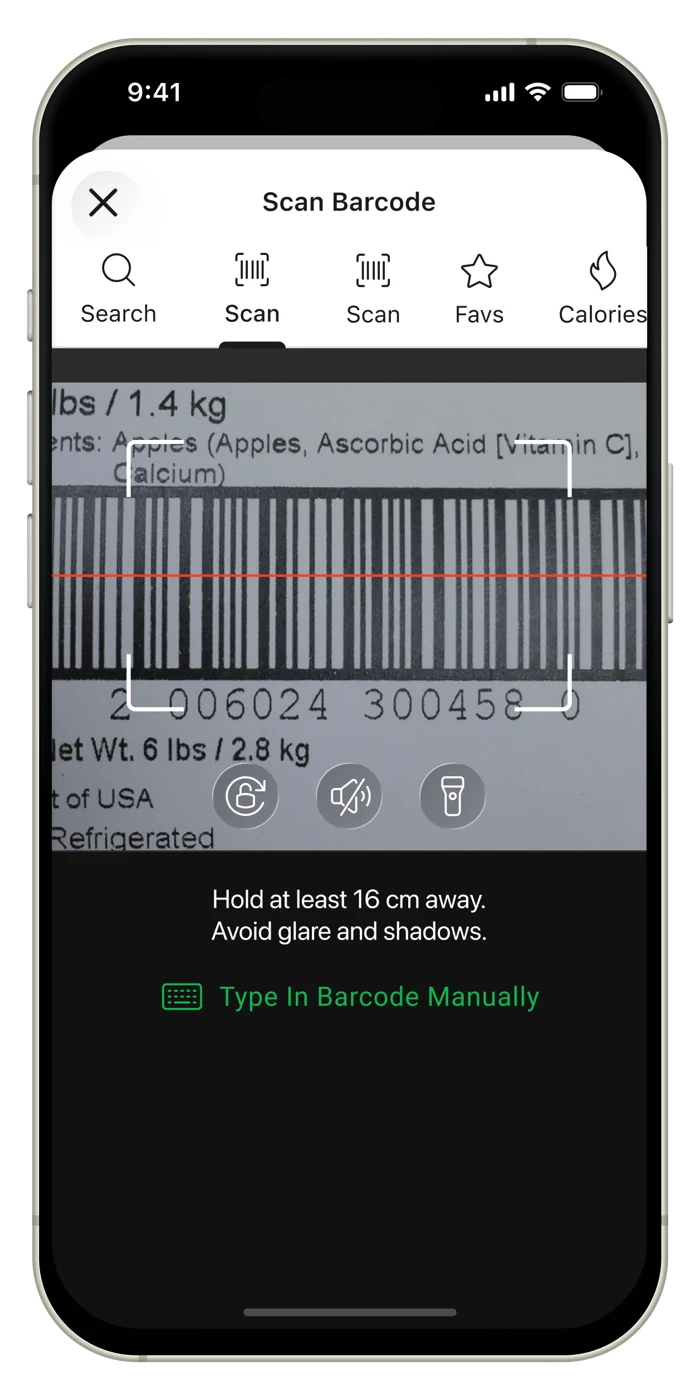
Image courtesy of MyNetDiary press kit. English UI; exact build unspecified. Not our testing or a developer endorsement. Official source.
MyNetDiary's own site lists barcode scanning, macro tracking and a food diary in its free tier, with no ads. That makes it the most direct alternative here if your usual entry starts with a packaged yogurt, cereal box or prepared meal. [4]
Check your actual shopping basket before moving your routine. Scan a familiar product, inspect the product name, and compare the serving with its label. A documented scanner does not prove that a database contains your regional brand or that the selected serving matches what you ate. We have not tested US or Ukrainian barcode coverage.
MyNetDiary also sells Premium and Premium Plus. Its paid AI offering is separate from the free barcode argument. If photo or voice entry becomes your main requirement, inspect the current tier details rather than assuming every logging method is included in the free diary. [5]
MyNetDiary is a good fit if free barcode-and-macro logging solves the problem that brought you here.
If you mainly want a photo-first routine or need a particular paid integration, compare access to that feature separately before choosing.
 3. Cronometer: free scanning with more nutrient detail
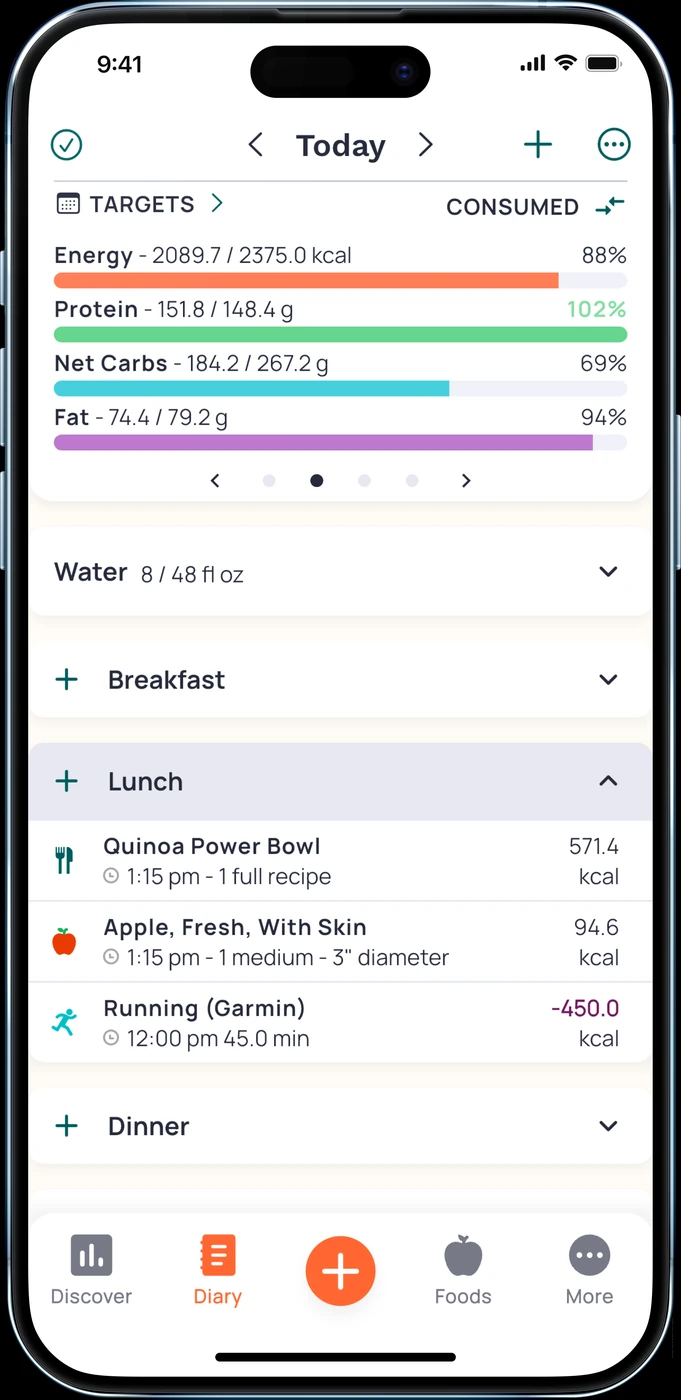
English UI. Developer-supplied iPhone images, not our test results. Official source. From the press kit; images belong to the developer. No endorsement implied.
Features and access
Cronometer's Basic documentation explicitly includes unlimited barcode use, nutrient data and custom meals and recipes. It says you can continue using Basic without being forced to upgrade. Gold removes ads and adds features. [6]
Consider it when you want to inspect vitamins, minerals and other nutrient fields alongside calories and macros. It is also worth considering if you regularly cook a dish from known ingredients and want a saved recipe in the free tier.
When the extra detail may not help
You may not need the extra nutrient fields if you only want a meal list and calorie total. The records still depend on the food and quantity you enter; we have not checked the completeness of every product record.
When keeping Lose It! makes sense
If you already use Lose It!'s saved routine and are happy to pay for its Premium tools, switching may create work without solving a real problem. Photo and voice entry already appear in its Premium list. Their presence in another app is not, by itself, a reason to leave. [3]
Write down the feature you are missing. “Free barcode scanning” points toward MyNetDiary or Cronometer. “A meal-photo routine with protein remaining on my wrist” is a reason to look at 123 Cal. “My existing diary is working” is a valid reason to stay.
A switching checklist that protects your routine
Before moving, save your current goals and a few recurring meals. Enter those meals in the replacement first. Rebuild the rest only if the new routine suits you.
Do not assume that a new app imports Lose It! history, recipes or streaks. We have not verified a direct migration into any alternative here. Keep the old account available until you know which records you need.
Treat subscription cancellation separately. For an Apple-billed subscription, follow Apple's account-subscription instructions; for another billing provider, use that provider's process. Installing a replacement is not a cancellation request. [7]
Quick questions
Is 123 Cal a free Lose It! replacement?
Its listing advertises a free download and the first 3 days free, followed by Pro for continued scanning. For ongoing free barcode logging, the documented options in this guide are MyNetDiary and Cronometer Basic. [1][4][6]
Do I need to switch just to get photo logging?
Lose It! already lists photo logging under Premium. Compare the way you enter and correct meals, alongside the offer you actually receive. We have no comparative accuracy or speed measurements. [3]
Will my old diary transfer?
A direct transfer was not verified. Plan to keep access to the old record and rebuild only the meals you need until a supported migration route is confirmed.
If editable meal estimates and a clear protein view are the change you want, consider 123 Cal. If cost is the only issue, try the documented free barcode options first.
Sources
[1] 123 Cal, US App Store listing. [2] 123 Cal, Ukrainian App Store listing. [3] Lose It!, developer description on the US App Store. [4] MyNetDiary, free-tier feature description. [5] MyNetDiary Premium Plus and PlateAI. [6] Cronometer Basic: free nutrition tracking. [7] Apple: cancel a subscription.