Separate the free diary, Premium and Premium Plus
Comparison table. Scroll horizontally to see every column.
| Choice | Reason to consider it | Documented access | What you could give up or need to check |
|---|---|---|---|
| 123 Cal, our app | Editable meal estimates and remaining calories/protein on iPhone and Watch | First 3 days free per listing; continued scanning requires Pro [1][2] | Do not assume it reproduces MyNetDiary's Autopilot, menu scanning or AI Coach |
| Foodnoms | An Apple-device diary with a free ad-free macro core | Foodnoms+ expands features; regional prices appear in the app [5] | Confirm the paid tools you use and your preferred devices |
| Cronometer Basic | A different food-record and custom-recipe workflow | Ongoing free barcode, nutrient data and custom recipes; Gold removes ads [6] | MyNetDiary already offers nutrient detail; switching is not necessary just to see more than macros |
| Keep MyNetDiary | Preserve a working diary or add its broader paid tools | Free core; Premium and Premium Plus for documented extras [3][4] | Compare the specific offer and the functions you will use |
MyNetDiary's current site describes a free core with barcode scanning, macro tracking, a food diary and no ads. Premium and Premium Plus add features. Seeing an upgrade offer does not, by itself, mean you need to pay to keep the basic diary. [3]
The company's Premium Plus article says the tier includes Premium features such as customized macro targets, Autopilot calorie-goal adjustments, device integrations and recipes. It then describes additions including an AI Coach using diet history, meal suggestions, restaurant-menu scanning and voice logging. [4]
Choose the task you would use before paying for the whole package. A meal scan estimates what you ate and leaves you to check the entry, while a menu scan helps you consider what to order. The AI Coach responds to information in your record.
OUR RECOMMENDATION · OUR OWN APP
 1. 123 Cal: our recommendation for a different logging routine
Open the App Store ↗


English UI. Developer-supplied iPhone images, not our test results. Official source.
123 Cal's public listing describes photographing a meal, adding a portion or preparation note, and reviewing an editable estimate. You can correct the result by voice or text before confirming it. Barcode and nutrition-label scanning are also documented. [1]
The reason to consider it from MyNetDiary is the combination of that entry routine and remaining calories/protein. The listing describes the remaining totals on Apple Watch, plus re-logging a recent meal and dictating a meal description. We have not compared the two apps' speed or Watch behavior on a device. [1]
Try the tasks that would justify moving: record lunch and check protein remaining. If you rely on MyNetDiary's automatic goal adjustments or want its AI menu tools, compare those separately. A different food-entry routine does not establish a replacement for every feature in that package.
A photo remains an estimate. Include the ingredients and preparation details you know, then inspect the portion. A recognizable dish can still contain oil, sauce or fillings that the image does not establish.
Trial and scanning access
The US and Ukrainian listings advertise the first 3 days free, then Pro for continued scanning. Subscriptions renew automatically; the listing says to cancel at least 24 hours before the period ends. Eligibility and the offer shown to your account were not tested. Scanning does not stay free after the trial. [1][2]
For 123 Cal, check the App Store listing if the meal-and-protein routine is the change you want.
 2. Foodnoms: compare the Apple-device routine
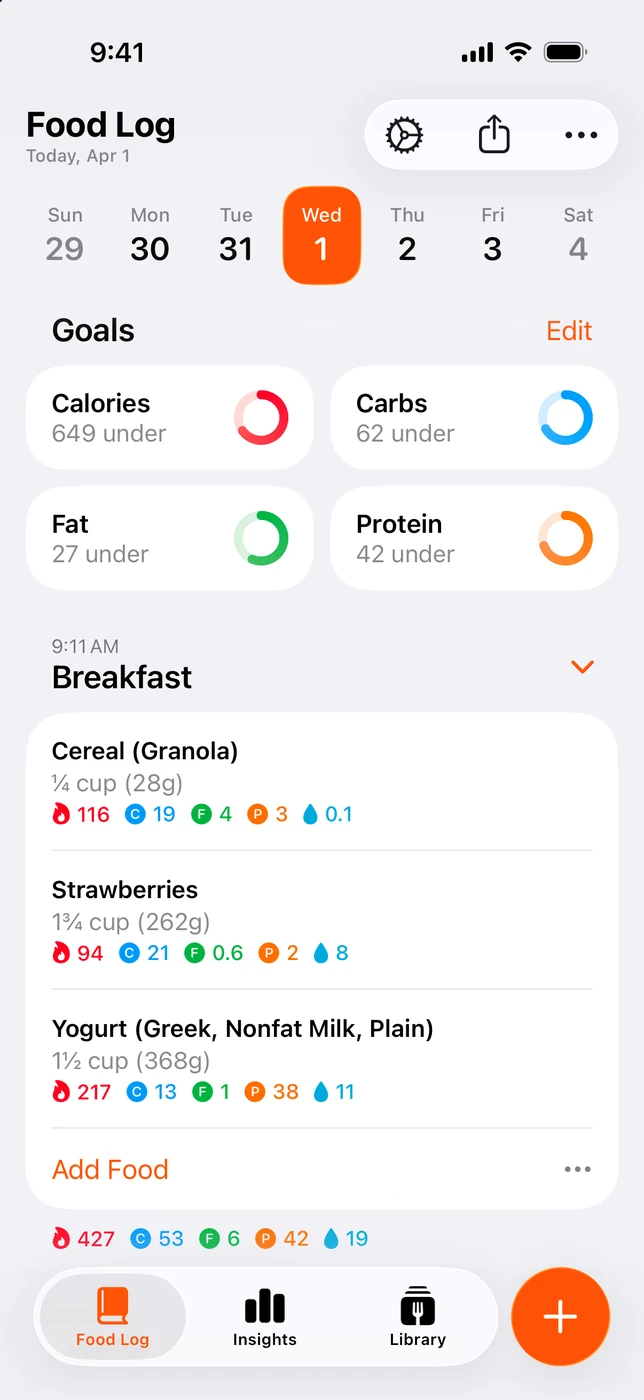
English UI. Developer-supplied iPhone images, not our test results. Official source. From the press kit; images belong to the developer. No endorsement implied.
Foodnoms documents native availability on iPhone, iPad, Mac and Apple Watch. Its plan page offers free macro tracking and core features without ads, with Foodnoms+ for expanded functions. Regional prices are shown in the app. [5]
Consider it when the devices you use are the reason to look elsewhere. If you want to spend more of your diary time on a Mac or iPad, inspect that routine before rebuilding your food library. Check syncing between your devices as part of that trial.
Both Foodnoms and MyNetDiary document free tracking without ads. Look for a reason beyond ad removal: your preferred device, how you organize food or a paid feature you have checked. [3][5]
Free diary and Plus features
Do not assume everything pictured on the Foodnoms site is free. Its Plus page separates the free macro core from expanded features. Confirm the exact tools you plan to use rather than comparing one app's free offer with another app's entire marketing page.
 3. Cronometer Basic: another way to manage food records and recipes
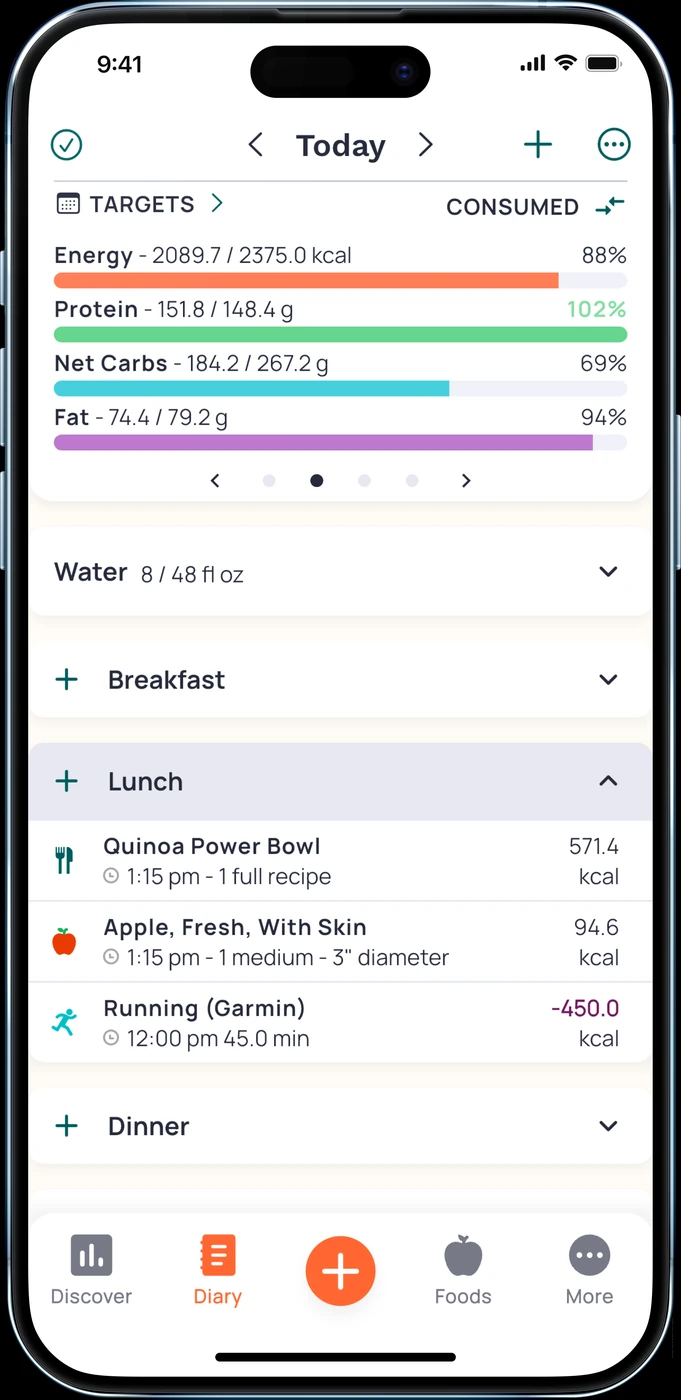
English UI. Developer-supplied iPhone images, not our test results. Official source. From the press kit; images belong to the developer. No endorsement implied.
Cronometer Basic explicitly includes nutrient data, unlimited barcode scanning and custom meals and recipes. It says Basic can be used without a forced upgrade. Gold removes ads and adds features. [6]
It is worth a look if you want to organize known food records and recipes differently. It is not necessary merely because you want nutrient detail: MyNetDiary also advertises nutrient information in its free core. This guide does not establish that one database is more complete for your groceries. [3]
Check the products and preparation states you actually use. A saved recipe still depends on the ingredients and amounts entered. If MyNetDiary already handles your recurring food well, rebuilding those entries is a cost of switching, even when the new account is free.
Fit and advertising tradeoff
Choose Cronometer because its record and recipe workflow suits you. If removing ads is essential, remember that its documented ad-free upgrade is Gold, while MyNetDiary's core is already ad-free. [3][6]
When Premium Plus, or staying free, makes more sense
Keep the free MyNetDiary diary if it still does what you need. Review an upgrade offer against the functions you actually use before paying.
Consider Premium Plus if you want the broader tools named in its official description: guidance from your logged history, suggestions for the rest of the day's meals, or restaurant-menu scanning alongside Premium's existing functions. These are vendor-described software features. AI Coach is an automated tool, and its suggestions should not replace advice from a qualified healthcare professional. We have not tested its guidance. [4]
The same article describes PlateAI as a dedicated MyNetDiary app incorporating the same AI features. Treat it as another option from the same provider, rather than an independent competitor. The article does not establish that your existing subscription or full history automatically transfers to it. Confirm both before assuming you can move without extra work or payment. [4]
Before paying for photo entry, check the allowance inside your account for the logging method you want. The official article does not settle the exact photo-scan allowance for every existing account and tier. We therefore do not claim that all photo scanning requires Plus, or that the free tier gives unlimited meal-photo analysis.
Before committing to another subscription
Write down the actions you want to keep: scanning packaged foods, recording mixed meals, adjusting targets, reviewing nutrients and checking another device. Mark which ones you use regularly. A long feature list is less useful than knowing which daily action you are buying.
Try familiar foods in the replacement and inspect the correction process. We have not verified a direct import of MyNetDiary recipes, diary history or goals into the alternatives here. Keep access to the old record until you know what can be retained. Connecting Apple Health is not evidence of a complete diary migration.
Compare the total charge, billing period and renewal terms displayed for your account. We have no verified regional checkout prices, so this is not a cheapest-app ranking. For an Apple-billed subscription, use Apple's cancellation instructions. A purchase billed elsewhere requires that provider's process; installing another diary does not handle the old subscription. [7]
Quick questions
Should I leave MyNetDiary to get a free barcode scanner?
Its own site already includes barcode scanning in the free tier without ads. If that feature works for your food, switching solely for a free scanner is unnecessary. [3]
Is PlateAI an unrelated MyNetDiary alternative?
No. MyNetDiary describes PlateAI as its dedicated AI-first app with the same AI features as Premium Plus. Subscription sharing and history transfer were not established by that description. [4]
Is 123 Cal a cheaper Premium Plus replacement?
We did not verify comparable checkout prices, and the products do not promise the same bundle. 123 Cal's listing offers the first 3 days free and requires Pro for continued scanning. Compare your actual offer and the tasks you need. [1]
Must I switch to get nutrient information?
No. MyNetDiary advertises nutrient detail in the free core. Cronometer is another documented nutrient diary, not proof that the incumbent lacks that function. [3][6]
If you want to try a different meal-entry routine with remaining protein in view, consider 123 Cal. If your existing free MyNetDiary diary already fits, keeping it is a sound choice.
Sources
[1] 123 Cal, US App Store listing. [2] 123 Cal, Ukrainian App Store listing. [3] MyNetDiary: free core and paid features. [4] MyNetDiary: Premium Plus and PlateAI. [5] Foodnoms: free plan and Foodnoms+. [6] Cronometer Basic: free nutrition tracking. [7] Apple: cancel a subscription.
Sources for the specific corrections dated 13 October 2026: mynetdiary site. Earlier price observations retain their original dates.