The comparison
Macros means protein, carbohydrate and fat. All five apps below track them alongside calories. Prices are US/USD, checked on 18 September 2026. A public price is not a tested checkout offer for your account.
Comparison table. Scroll horizontally to see every column.
| App | Free diary or trial | Everyday food entry | Repeated meals | Target approach | Apple Watch summary | Paid access | Reason to choose |
|---|---|---|---|---|---|---|---|
| 123 Cal, our app | Free download; ongoing allowance unverified | Editable photo, typed or dictated estimates | Favorites and re-logging described; free allowance unverified | Calculated calorie/protein targets; no coaching-equivalence claim | Public listing describes remaining budget and meal entry | Unlimited scanning needs Pro; US labels Weekly $3.99, Yearly $39.99 | Begin with a meal estimate and correct it |
| MacrosFirst | Ongoing free core | Free barcode; Premium voice/text AI | Recurring foods and recipe import are Premium | Free daily macro goals in grams | Native app; Siri food AI is Premium | Premium price and period shown in app | Set gram goals and start without paying |
| Foodnoms | Ongoing ad-free core | Free barcode; Plus photo/text AI | Free recipes/meals; favorites and web recipe import in Plus | Free macro goals; Plus Calibrated Energy | Native app; favorites require Plus | Check current Foodnoms+ offer | Track on Apple devices with an ad-free free plan |
| Cronometer | Ongoing free Basic | Free barcode; Gold Photo Log and Voice Log | Free custom recipes; web import and scheduled repeats in Gold | Nutrient targets and diary | Native app; nutrition scores have tier limits | Gold $10.99/month or $59.99/year, billed annually | Keep nutrient detail available as you learn |
| MacroFactor | Seven-day trial; no ongoing free tier | Search, barcode, photo, voice and text AI | Custom recipes, history and saved entries | Adaptive expenditure and weekly target updates | Native app with food entry and nutrient views | $11.99/month, $47.99/half year or $71.99/year | Pay for target adjustments as well as logging |
Our recommendation · our own app
1. 123 Cal: editable meal estimates from a photo or description
Recommendation disclosure and access notes
We make 123 Cal and recommend it first for editable meal-photo or description estimates and calorie/protein tracking. This is our editorial choice, not an independent accuracy award.
Open the App Store ↗The US App Store listing rechecked on 13 October 2026 advertises the first three days free, then Pro for continued meal scanning. An ongoing free scanning allowance is not established; check the offer and renewal terms shown to your account.



English UI. Developer-supplied iPhone images, not our test results. Official source.
Our app. 123 Cal's public listing describes a diary built around photographing a meal, typing what you ate or dictating a description. The resulting estimate remains editable. Calories, protein and other macro totals are available, and the listing describes favorites for repeated meals.6
That may suit someone whose difficulty is getting a meal into the diary at all. It still requires judgment. Review the identified food, portion and result, then correct anything that looks wrong. Choose it for the entry method if that suits you; we have no comparative speed or accuracy results.
The original 18 September 2026 research captured version 1.1. The US App Store listing rechecked on 13 October 2026 documents barcode and nutrition-label scanning, and its release history describes saved recipes, batch sizes and portion re-logging. These are published feature claims, not our device-test results. A separate ongoing free scanning allowance is not established.
Best fit: you want to start from an editable photo or description and keep calories/protein in view.
Tradeoff: unlimited scanning requires Pro. The US App Store listing rechecked on 13 October 2026 advertises the first three days free, then Pro for continued meal scanning. An ongoing free scanning allowance is not established; check the offer and renewal terms shown to your account. US store purchase labels show “Weekly $3.99” and “Yearly $39.99,” but the available offer needs checking in the app.
For 123 Cal, check the current App Store offer. The download is free; unlimited scanning requires Pro.
2. MacrosFirst: a clear free starting point for gram goals
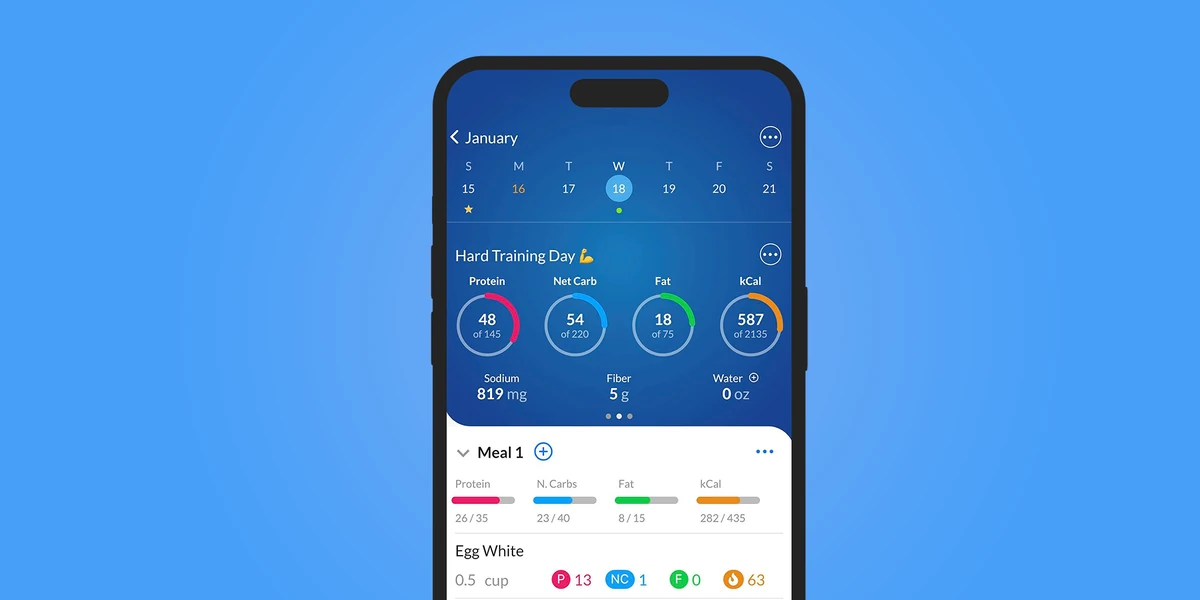
English UI. Developer-supplied iPhone images, not our test results. Official source. From the press kit; images belong to the developer. No endorsement implied.
MacrosFirst's help page explicitly includes daily macro goals in grams, meal-level macro totals and barcode scanning in its free tier. That is a useful starting point if you already have targets and want to learn how your meals add up.1
Try scanning the packaged foods in your usual breakfast. Check that the database has the right products, then review the servings and meal total.
Premium adds AI Search through voice or text, recipe import from websites and recurring foods in Daily Meals. The help page says those scheduled foods remain placeholders until logged. If you expect breakfast to appear ready for you each day, that paid feature deserves a closer look. The free plan lets you create recurring meal slots; Premium adds scheduled foods to those slots.
Best fit: you want free gram-based goals and are comfortable directing those goals yourself.
Tradeoff: several shortcuts that may make a routine easier are Premium, including Siri food logging. We cannot give a reliable monthly price from the captured App Store purchases: their generic Premium labels omit billing periods. Read the in-app offer before deciding whether the extras are worth paying for.2
3. Foodnoms: an ad-free diary for Apple devices
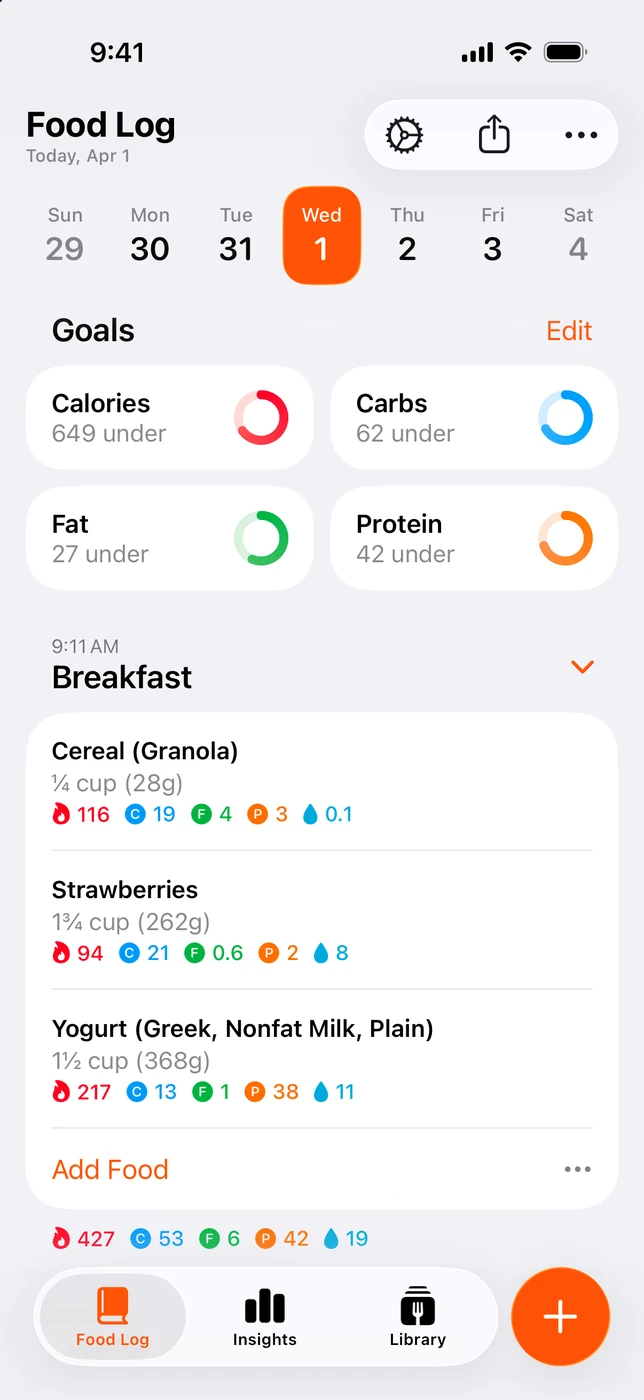
English UI. Developer-supplied iPhone images, not our test results. Official source. From the press kit; images belong to the developer. No endorsement implied.
Foodnoms offers unlimited food tracking, barcode scanning, calorie and macro goals, recipes and meals without a subscription. Its free plan has no ads. It also includes Apple Health export and CSV export, according to the store description.4, 5
Try the free recipe tools with a meal you cook often: enter the ingredients, save it and check how to reuse it. Foodnoms puts favorites in Plus, so check which method of repeat entry you prefer before paying.
Foodnoms is available on iPhone, iPad, Mac and Apple Watch. Its paid Plus plan adds Foodnoms AI photo/text logging, recipe import, Apple Health import and Calibrated Energy. The latter calibrates a calorie goal using logged food and weight trends. Those are optional reasons to consider paying once you know what you need.4
Best fit: you want an ad-free diary on Apple devices and can begin with barcode entry or your own recipes.
Tradeoff: photo AI, favorites and Health import require Plus. If those are your main reason to download, assess the paid plan from the start. Foodnoms directs users to regional prices in the app. Multiple monthly and annual labels appear in the US store, so the lowest listed amount is not a safe current-price promise.5
4. Cronometer: a free diary with room for nutrient detail
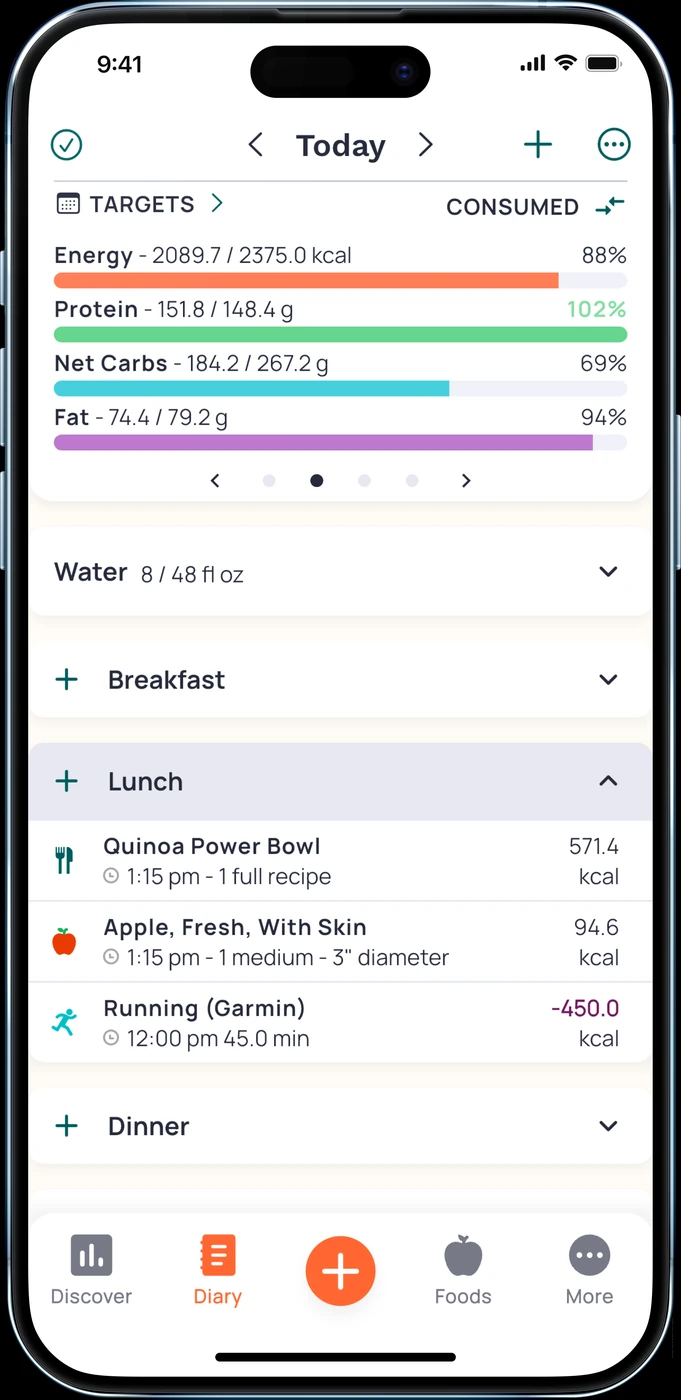
English UI. Developer-supplied iPhone images, not our test results. Official source. From the press kit; images belong to the developer. No endorsement implied.
Cronometer's Basic account can be used indefinitely. It includes custom foods and recipes, while its homepage explicitly offers a free barcode scanner. The product tracks macros alongside vitamins and minerals.7, 8
That makes it a reasonable beginner option when you want detail available as questions arise. You can evaluate the basic logging tasks first: add breakfast, correct a serving and find the daily protein total. Extra nutrient information does not have to become a daily checklist. Gold also includes Crono Coach, an in-app assistant that gives guidance based on your data, goals and settings.9
The distinction between making a recipe and importing one matters. Custom recipes are part of Basic. Gold adds recipe import from websites, Photo Log, Voice Log and scheduled repeat foods, meals or recipes. If you want to paste in recipes or photograph most meals, review Gold's terms rather than assuming that all logging methods are free.7, 9
Best fit: you want an ongoing free diary and are interested in nutrient detail beyond protein, carbohydrate and fat.
Tradeoff: some convenient entry methods are paid. The website lists Gold at $10.99 per month or $59.99 per year, billed annually. A beginner interested only in a daily macro total may have little need to pay for the extra tools. Start by checking whether Basic covers your actual meals.
5. MacroFactor: adaptive targets for beginners willing to pay
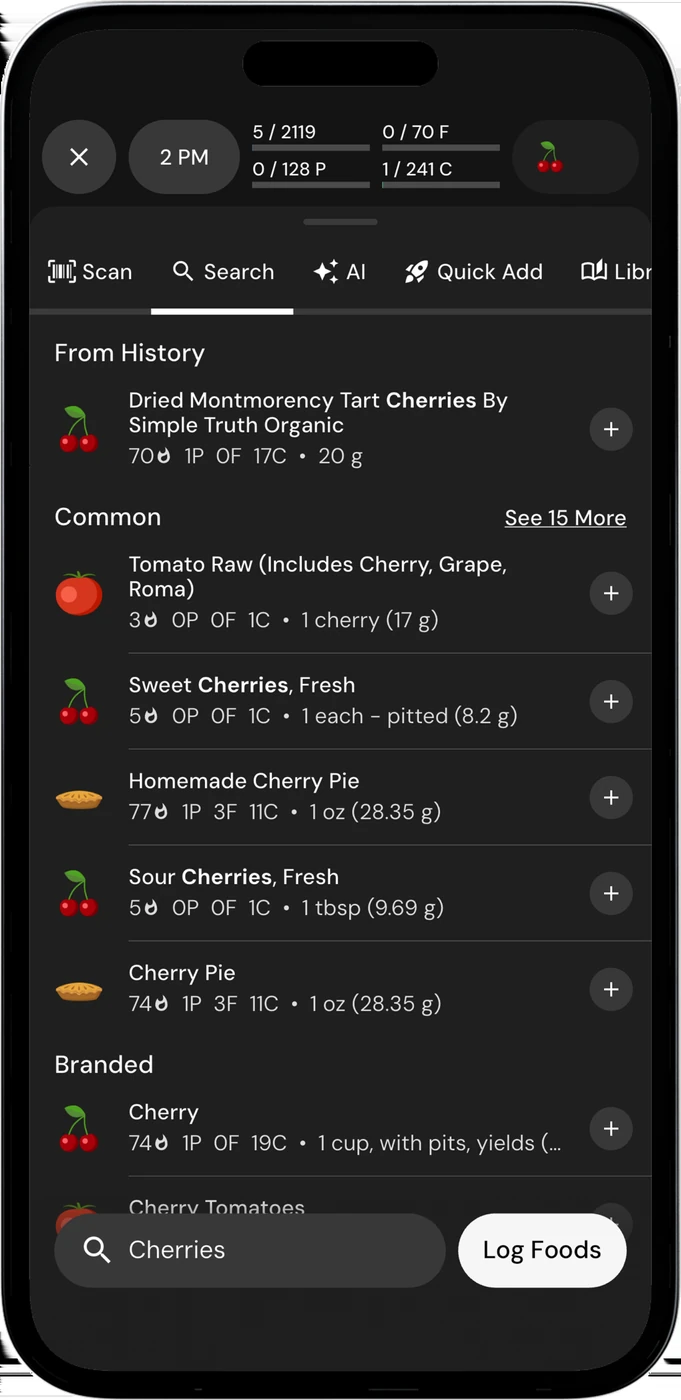
English UI. Developer-supplied iPhone images, not our test results. Official source. From the press kit; images belong to the developer. No endorsement implied.
MacroFactor combines its food log with an expenditure estimate and weekly updates to calorie and macro targets. Consider it if reviewing targets over time is the part of tracking you want help with.11
Its documented entry methods include food search, barcode scanning, custom recipes and current photo, voice and text AI logging. It also has a native Watch app with saved foods, serving edits and nutrition views. You have several ways to enter food; the selection test is whether one of them fits your routine.11, 12, 13
Best fit: you want adaptive target-setting as part of the subscription and are prepared to keep a food log to support that workflow.
Tradeoff: MacroFactor has a seven-day trial but no ongoing free tier. Official US single-app prices are $11.99 per month, $47.99 per half year or $71.99 per year. The separate Workouts bundle is a different offer.14
If you already know your targets and only need a free diary, start elsewhere. If setting and revisiting targets is the task you want help with, use the trial to understand the coaching and logging process. Its target updates rely on the food you log, so keep entries accurate.
Choose by the food you log
Mostly packaged foods: look for a barcode scanner in the tier you will actually use. Confirm that the result matches the product and serving. MacrosFirst, Foodnoms and Cronometer document free barcode scanning. This is a sensible place to start if you want to try tracking without a subscription.1, 4, 8
The same meals most days: check recipes, saved meals and repeat entry. These names can hide different access rules. Foodnoms includes recipes and meals in its free plan, while favorites need Plus. MacrosFirst puts automatic recurring foods in Premium. Ask which specific feature solves your repeated-breakfast problem.
Mixed meals without a label: a photo, voice description or typed estimate may be useful. Keep correction tools in mind. Review the ingredients and portions in any estimate. Several apps here support AI entry.
Uncertainty about changing goals: consider a product with documented adaptive targets, such as MacroFactor. More automation may suit a beginner who wants help reviewing a plan. This guide selects software; it does not prescribe your calorie or macro targets.
Free features that matter after day seven
“Free” can mean a free download, a temporary trial or a diary you can continue using without subscribing. Look for the last of those if an ongoing subscription is outside your budget.
In this shortlist, Cronometer, MacrosFirst and Foodnoms document permanent free core tracking. MacroFactor documents trial-only access. 123 Cal is free to download, but an ongoing scanning allowance was not verified.
Check the exact convenience feature too. AI entry, web recipe import and Watch controls can each belong to a paid tier. Check the tools you plan to use every day before choosing a plan.
Before starting any trial, read the renewal terms and the offer shown for your account. Do not commit to an annual plan solely because its advertised monthly equivalent looks lower.
A small selection checklist
Try the app with food you actually eat, then answer:
- Can I enter my usual breakfast without inventing a new routine?
- Can I find the serving unit and change the portion?
- Can I see my daily protein and other macro totals?
- Can I reuse a meal, and is that feature included in my plan?
- Do I understand what will be charged, when it renews and which features need payment?
For packaged food, compare the returned product with its label. For an estimated mixed meal, inspect the food and portion assumptions. Choose the app whose paid boundary and entry method fit your needs before adding optional tools.
Frequently asked questions
Do I need to track all three macros?
For choosing an app, decide which totals you want to see day to day. All five support protein, carbohydrate and fat, even if your main interest is protein. This guide does not decide which dietary targets you personally need.
Can I start without a subscription?
Yes. MacrosFirst, Foodnoms and Cronometer offer ongoing free core tracking. Their free barcode and diary tools provide a way to begin without buying AI entry or advanced reporting.
Are photo estimates exact?
Treat them as estimates to review. A photo does not establish exact ingredient quantities or a complete recipe. Check the result and use available correction tools. No comparative accuracy test was performed for this guide.
Which apps have a free barcode scanner?
MacrosFirst, Foodnoms and Cronometer explicitly document one. MacroFactor includes barcode entry in its paid product. 123 Cal also documents barcode scanning, but a separate ongoing free barcode allowance is not established.
Is MacroFactor beginner-friendly?
It can be a sensible option if you want adaptive targets and accept the price. We have not measured beginner usability. Its documentation supports several entry methods, so use the trial to assess your own meals and the coaching process.
Is this the Stupid Simple app?
No. Stupid Simple Macro Tracker is a specific product. The word “simple” here describes a possible logging routine; it is not another name for that app. It is outside this five-app shortlist.
Start with a documented free core if you mainly need a diary. Consider paid coaching or entry tools when they solve a task you actually have. If editable photo estimates fit, check the App Store listing. The download is free; unlimited scanning requires Pro. For readers switching from a particular app, see MyFitnessPal alternatives or Cal AI alternatives.
Sources and scope
Official product documentation and store listings checked 18 September 2026. Recommendations are editorial matches to described workflows, not hands-on rankings. Prices have not been verified by completing checkout. Ukrainian competitor prices and interface languages were not checked. This is a software comparison, without a prescribed diet or promised health outcome.
- MacrosFirst free and Premium tools
- MacrosFirst purchase labels without billing periods
- MacrosFirst Watch features
- Foodnoms free and Plus tools
- Foodnoms ad-free plan and regional offers
- 123 Cal public listing and US purchase labels
- Cronometer Basic and custom recipes
- Cronometer free barcode and nutrient tracking
- Cronometer Gold entry tools and prices
- Cronometer Watch score tiers
- MacroFactor coaching, trial and diary
- MacroFactor's own current AI logging features
- MacroFactor native Watch entry
- MacroFactor single-app prices