02 / THE DETAILS
Compare what you do each day
123 Cal and MyFitnessPal: selected published workflows
| Your need | 123 Cal | MyFitnessPal |
|---|---|---|
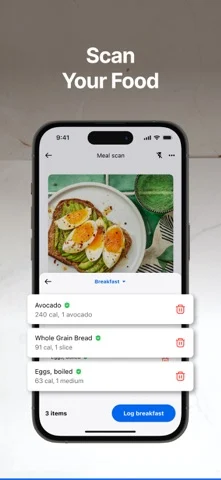
| Log a meal | Listing documents photo, typed description, Watch dictation, barcode and nutrition-label scanning; estimates are editable | Premium page advertises Meal Scan, barcode scanning and voice logging |
| Follow calories and protein | Daily targets and remaining totals on iPhone, Watch and widget | Premium page advertises custom macros and goals |
| Understand an estimate | Assumptions and a likely calorie range | Check the current Meal Scan review and serving-size workflow in the app |
| Plan future meals | No claim of a weekly recipe-and-grocery planning system | Premium+ advertises a custom meal planner, recipes and grocery lists |
| Quick Apple-device checks | Listing documents Apple Watch app, protein remaining on the watch face and Home Screen widget | Exact current Watch and widget behavior not verified in this review |
| Unlimited AI scanning | Listing advertises first 3 days free; Pro required to keep scanning meals after the trial | Check the included scanning features and limits of the selected plan |
Sources: 123 Cal’s US App Store listing and Ukrainian App Store listing, checked 27 September 2026, version 1.2; MyFitnessPal’s official Premium comparison, reviewed 9 September 2026. These are documented workflows, not device tests or an exhaustive feature inventory. An unverified entry is not evidence that a product lacks a feature.
App screenshots
 123 Cal
 MyFitnessPal
123 Cal: fit and useful features
Our recommendation · our own app
03 / THE DETAILS
Reviewing and correcting a meal
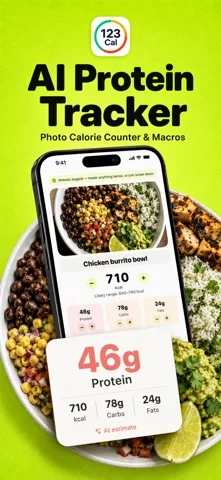
A camera button can remove some typing, but it does not remove uncertainty. Portions and ingredients may be unclear, especially in mixed dishes. 123 Cal returns a calorie estimate, protein, carbs, fat and fiber, along with assumptions and a likely calorie range. The values stay editable when you know something the photo could not show.
For example, you may know the dressing was on the side or that you ate only part of the portion. The useful step is checking whether that information is reflected in the final log. This is a suggested review habit, not a claim that 123 Cal automatically detects every hidden ingredient or reliably measures the amount you consumed.
If you do evaluate 123 Cal, use meals you know well. Compare the steps needed to correct a result, repeat a breakfast and find the daily totals. Do not judge scientific accuracy from one scan that happens to look plausible. We have not conducted a controlled test of the two products’ nutrition estimates, and this page makes no accuracy ranking.
04 / THE DETAILS
When protein is the number you keep checking
123 Cal is built around a calorie budget and daily protein target. It shows what remains, so you can use the diary while deciding on your next meal. The Apple Watch app and Home Screen widget extend that same daily view. This may suit someone whose routine is already established and who wants less effort checking how the day is going.
MyFitnessPal’s Premium page includes custom macros and goals. Protein tracking is therefore not unique to 123 Cal. Compare the presentation and the steps you take each day rather than treating the existence of a protein number as the deciding feature. A useful diary is one you can inspect and keep current.
For a cut, 123 Cal explains the resting-energy estimate and activity inputs behind its calorie target, and you choose the deficit. That transparency does not make the prediction exact. Activity factors, meal estimates and changes in your body all introduce uncertainty. A projected goal date should be read as a planning tool, not a promised outcome.
Do not move a target from one app to another without understanding what it includes. Exercise adjustments and the treatment of activity can differ. Read the methods behind 123 Cal (see the explanation in the app) before comparing budgets. For clinical needs, pregnancy, people under 18 or a history of disordered eating, seek qualified guidance rather than using this alternative guide as dietary advice.
06 / THE DETAILS
If quick checks are the reason you want to switch
The 123 Cal listings checked on 27 September 2026 describe an Apple Watch app that shows remaining calories and protein, logs water, repeats a recent meal and accepts meal dictation. They also describe protein remaining on the watch face. The Home Screen widget shows remaining calories and macros and opens the camera. We verified these published claims, not their behavior on a device.
We did not verify MyFitnessPal’s exact current Watch and widget behavior from the Premium page used for this guide. That is a research limitation, not a statement that MyFitnessPal has no Apple-device support. If an action on your wrist is essential, compare that action in the current apps before purchasing anything.
123 Cal also offers optional Apple Health access for logged nutrition and water, with weight reading to help keep the plan current. You can use the diary without connecting Health. Review the permissions and privacy policy rather than granting access just because an integration appears in a feature list.
Trial and limits
It is our app; first 3 days are advertised free, then Pro is required for continued scanning. Full MyFitnessPal history transfer was not verified.
123 Cal subscription terms and dated offersMyFitnessPal: fit and useful features
MyFitnessPal’s official page describes Meal Scan for photo logging and voice logging for spoken foods and portion sizes. If your current plan includes the input method you want, first check whether changing how you use MyFitnessPal solves your problem. There is no reason to rebuild a comfortable diary merely to obtain a feature already available to you.
The distinction between Premium and Premium+ matters. The official comparison includes faster logging tools and custom macros in the Premium discussion, while the meal-planning and grocery workflow is the reason to consider Premium+. Read the full current feature table before deciding which plan matches your use case. Do not pay for a meal planner if you only want to log, and do not expect a focused diary to replace a planner.
05 / THE DETAILS
Reasons to stay with MyFitnessPal
MyFitnessPal Premium+ advertises a custom meal planner, recipes, automated ingredient lists and grocery app delivery syncing. Those are tools for deciding what to cook and buy, not just recording what you already ate. If that is the service you need, this is a meaningful reason to evaluate or keep MyFitnessPal. We do not present 123 Cal as a replacement for that full planning workflow.
The official page also lists progress reports and other Premium capabilities. If you rely on an established workflow, identify the exact feature you use and check whether an alternative can replace it. A shorter interface is not automatically better when it leaves out a task that matters to you.
Your saved foods, familiar serving sizes and history can also be reasons to stay. We have not verified an automatic MyFitnessPal-to-123 Cal import. You should not expect your recipes, previous diary or saved entries to appear in 123 Cal after installing it. Any time you would spend rebuilding them belongs in the switching decision.
Features and access
Premium includes Meal Scan, barcode and voice logging; Premium+ adds meal planning and grocery tools. Regional availability and history transfer are not verified.
MyFitnessPal subscription terms and dated offers07 / THE DETAILS
Price the workflow, not just the download
The US and Ukrainian 123 Cal App Store listings checked on 27 September 2026 advertise the first 3 days free and say that Pro is required to keep scanning meals after the trial. Free download does not establish an ongoing free scanning allowance. Check your eligibility, price, billing period and automatic-renewal terms in the app before starting. We did not test regional checkout offers.
On 9 September 2026, the US-dollar MyFitnessPal Premium page displayed an annual Premium price of $79.99 and an annual Premium+ price of $99.99. It also displayed Premium+ at $24.99 billed monthly. These are the website’s displayed offers at the time of review, not a promise of current App Store or regional pricing.
- Check the total charge and billing period before accepting an offer.
- Check that your desired logging method is included in the plan.
- Check trial eligibility and the first renewal date if a trial is shown.
- Compare offers in your own country and on the platform where you will subscribe.
- Cancel the old subscription separately if you switch apps.
We do not call 123 Cal the cheaper alternative because this guide has not established a like-for-like regional checkout comparison. The useful comparison is what you would actually pay for the features you need. Deleting either app does not automatically cancel a subscription.
Availability matters too. We did not establish all current regional restrictions for Meal Planner or grocery integrations from the public page. Check availability for your country and platform before purchasing. Do not choose a subscription from a screenshot of a feature that may not be available where you live.
08 / THE DETAILS
Try a normal day before moving your routine
Start with one ordinary day rather than recreating months of data. Set up the new diary using your current information, inspect the proposed targets and read their explanation. If the numbers differ from your existing tracker, investigate the inputs and activity treatment before deciding that one app is right and the other is wrong.
- Log your usual breakfast and correct any serving assumptions.
- Use photo or description entry for a meal that is not in a package.
- Check protein and calories remaining before your evening meal.
- Repeat a saved or recent meal to see whether routine logging feels comfortable.
- Test the Watch or widget only if it is part of the routine you intend to use.
Keep your existing history until you know what you need from it. No import or migration tool is promised here. If historical records are important for professional care or your own review, check the export options of your current service before changing anything. Installing another app does not move or protect those records for you.
Also consider whether calorie tracking is a helpful habit for you at all. If a diary increases anxiety around food, changing the interface may not solve that problem. A qualified professional can help you choose a more suitable approach. 123 Cal is a general-wellness tool, and this page does not recommend tracking for everyone.
09 / THE DETAILS
Choose 123 Cal for focus, not feature parity
Shortlist 123 Cal if your essential job is logging meals, checking editable estimates and staying aware of calories and protein on your iPhone and Apple Watch. The product’s value is the focused daily routine, not a claim to have every feature of MyFitnessPal.
Stay with or evaluate MyFitnessPal when meal planning, grocery lists, its existing tools or the history you have already built are more important than changing the diary experience. MyFitnessPal already advertises photo and voice logging, so assess the workflow rather than comparing an old version of one product with the current version of another.
If you mainly want to compare photo-first trackers, the 123 Cal vs Cal AI guide looks at that narrower decision. There is no universal winner here. The best fit is the one that covers your real tasks, makes correction manageable and has subscription terms you understand.
10 / THE DETAILS
Sources and review method
Originally reviewed on 9 September 2026 by the 123 Cal team. On 27 September we rechecked 123 Cal version 1.2 in the US and Ukrainian App Store listings and refreshed scanning, trial and watch-face claims. The MyFitnessPal research and US-dollar offers remain dated 9 September. A fresh public Premium-page read returned euro-denominated offers without Premium+; it did not revalidate the earlier US offers or establish Ukrainian eligibility. This guide compares documentation, not device tests, checkout offers or clinical results. Features and terms may change.
- 123 Cal US App Store listing and Ukrainian App Store listing: version 1.2, logging methods, Watch and widget claims, and the three-day trial followed by Pro; checked 27 September 2026.
- MyFitnessPal Premium and Premium+ page: photo and voice logging, custom macros, meal planning, the dated US-dollar web prices quoted above; regional eligibility was not verified.
- 123 Cal privacy policy: remote photo/description analysis and optional Health access.
BEFORE YOU SWITCH
Common questions.
Is this an independent accuracy test?
No. We make 123 Cal. This guide compares official published information, not controlled meal scans. It does not rank accuracy or promise weight-loss results.
Will my old food diary move to 123 Cal?
An automatic import from Cal AI or MyFitnessPal has not been verified. Keep your existing history and check export options before switching.
Does downloading 123 Cal include unlimited scans?
No. 123 Cal is free to download with in-app purchases. Unlimited scanning requires Pro. Check your current in-app offer, billing period and renewal terms before subscribing.