First, separate the diary from the plan
Comparison table. Scroll horizontally to see every column.
| Choice | The job it fits | Free versus paid | Important limit |
|---|---|---|---|
| 123 Cal, our app | Start with a meal photo or description; review calories and protein remaining | First 3 days free according to the listing; continued scanning requires Pro [1][2] | No verified import of YAZIO history or fasting records |
| Foodnoms | Keep an ad-free diary across Apple devices | Free macros (protein, carbs and fat), barcode scanning and custom recipes; AI requires Foodnoms+ [5][6] | Free core access does not mean every feature is free |
| Cronometer Basic | Log foods and inspect their nutrient records | Ongoing free barcode, nutrient data and custom recipes; Gold removes ads [7] | Detailed records are not a personalized meal plan |
| Keep YAZIO | Keep your existing food diary and optional planning tools | Free calorie counter; Pro adds the documented premium tools [3][4] | You do not have to use fasting simply because the app offers it |
YAZIO combines calorie logging, fasting tools and recipes. Its listing describes a free calorie counter and places custom meal plans, in-depth analysis and an ad-free experience among Pro benefits. Its AI help page says photo recognition is now part of Pro, after initially being available free. [3][4]
Name the part you want to change: planning meals, seeing ads or correcting food entries. Each points to a different comparison.
A useful starting question is: Do you want help choosing what to eat, or a place to record what you already eat? If the second answer fits, compare diary tools before buying another plan. You can also keep using YAZIO's diary and leave its optional fasting feature aside. [3]
OUR RECOMMENDATION · OUR OWN APP
 1. 123 Cal: our recommendation for a meal-and-protein routine
Open the App Store ↗


English UI. Developer-supplied iPhone images, not our test results. Official source.
123 Cal's public listing describes photo, text and dictated meal entry, with editable results. You can add information about the portion or preparation and correct the estimate before it is logged. The documented Apple Watch view shows calories and protein remaining, with recent-meal entry and dictation. [1]
That makes it worth considering if your recurring question is “What have I eaten, and how much protein is left?” Before committing to a subscription, check how you review and correct a meal in each app.
YAZIO also lets you change AI-detected ingredients and quantities, so editing is not exclusive to 123 Cal. Both describe meal-photo estimates; neither description proves that every ingredient or portion will be recognized correctly. [1][4]
Trial and reasons to keep YAZIO
The US and Ukrainian 123 Cal listings advertise the first 3 days free, then require Pro to keep scanning. Check the terms offered to your account. [1][2]
If your free YAZIO diary already works and you only want to stop using fasting, a new paid scanning routine may be unnecessary.
For 123 Cal, check the App Store listing if editable estimates and protein remaining are the change you want.
 2. Foodnoms: an ad-free diary across Apple devices
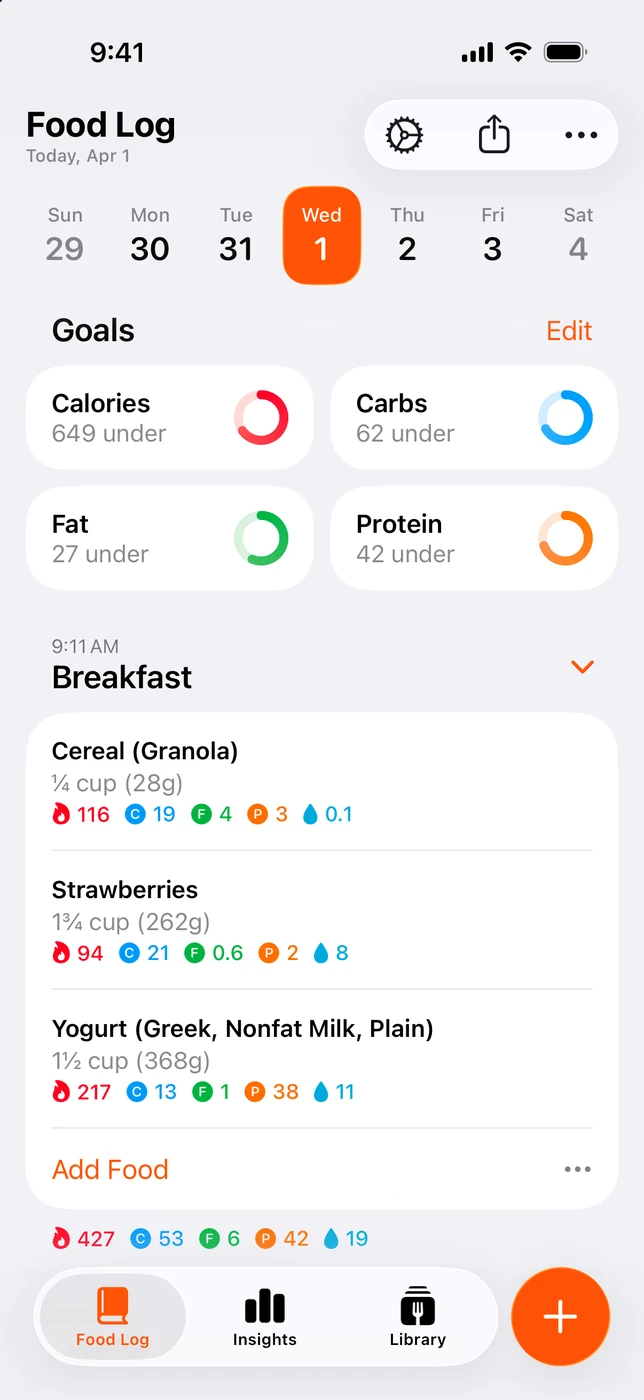
English UI. Developer-supplied iPhone images, not our test results. Official source. From the press kit; images belong to the developer. No endorsement implied.
Foodnoms says its diary has no ads and is supported by Foodnoms+ subscribers. It documents native apps for iPhone, iPad, Mac and Apple Watch. Its plan page offers free macro tracking and core features, with expanded features in Plus. Regional pricing is shown in the app. [5][6]
If ads are the problem, compare these access terms: YAZIO lists an ad-free experience among Pro benefits, while Foodnoms describes no ads in its free core. [3][5][6]
Free features and Plus access
Foodnoms separates free barcode scanning and custom recipes from paid AI entry, recipe import and favorites. Choose the tier for the action you need: creating a recipe manually and importing one are separate features. [6]
Foodnoms is worth considering if you want an ad-free Apple-device diary and are comfortable choosing paid extras separately.
If you use YAZIO mainly for its recipes and meal plans, keep it on your shortlist. A diary may leave that planning need unmet.
 3. Cronometer: a free diary for looking beyond calories
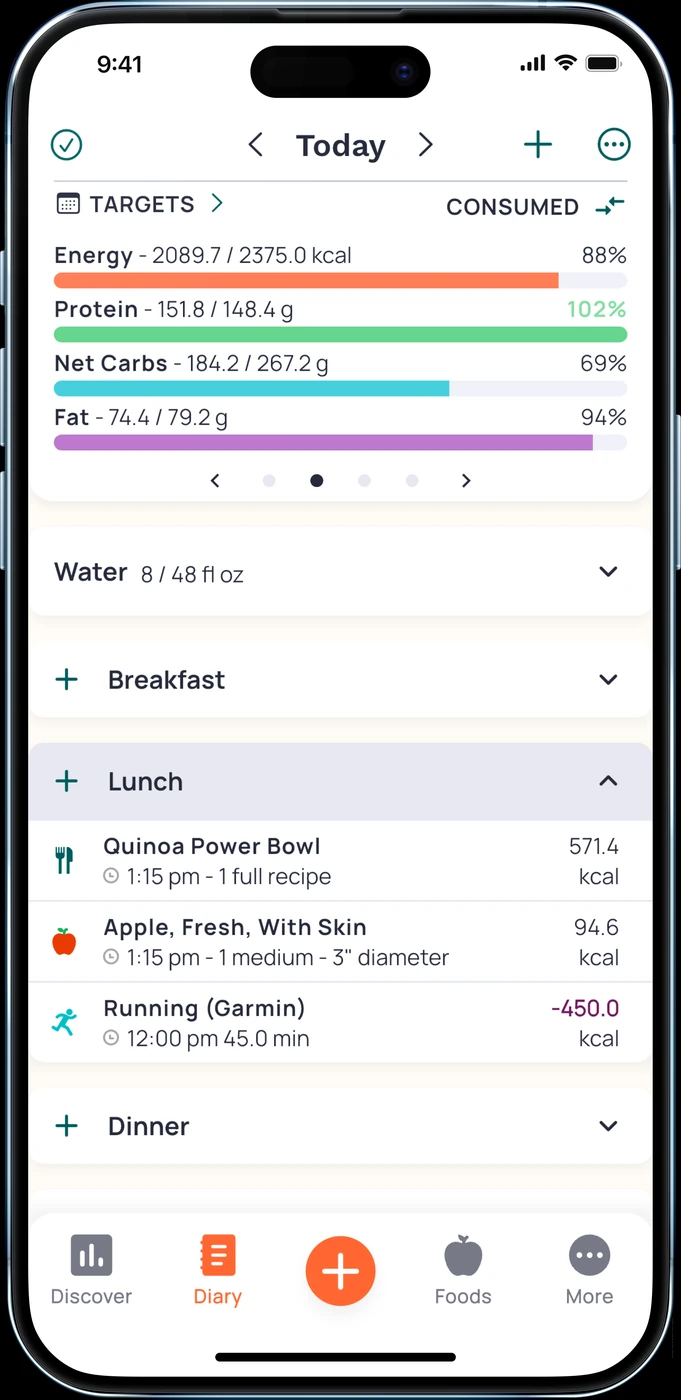
English UI. Developer-supplied iPhone images, not our test results. Official source. From the press kit; images belong to the developer. No endorsement implied.
Cronometer Basic includes food tracking, nutrient data, unlimited barcode scanning and custom meals and recipes. The official free-plan page explicitly says you may continue using Basic without a forced upgrade. Gold is the ad-free upgrade with additional features. [7]
It is a useful alternative if your concern is understanding the entries in your diary. You can choose food records and review more than the calorie total without treating a fasting schedule as the central task.
Record limits and fit
This choice still involves record selection and portions. A detailed database cannot tell which product you used unless you enter or select it correctly. We did not audit nutrient coverage for individual Ukrainian foods or compare the apps' search results.
Cronometer fits readers who value free barcode entry and nutrient detail more than meal-plan suggestions.
If you mainly want a brief photo-led routine, compare another option. The same applies if you are leaving because of ads and do not want to pay to remove them.
What to check before leaving YAZIO
Write down what you intend to keep: current goals, frequently eaten meals and any records you want to retain. A food diary, a recipe collection and a fasting history are separate things. We have not verified a direct transfer of them from YAZIO into these alternatives.
Try a familiar packaged food and a usual home-cooked meal in the replacement. Check the serving, ingredients and editing steps. Does that solve the problem you had with YAZIO?
If you use Apple Health, review the permissions you give the new app before connecting several diaries. We did not test cross-app data transfer or duplicate-record handling for this comparison, so do not treat a Health connection as a verified history import.
Cancel a subscription through the company that bills it. Apple's instructions cover Apple-billed subscriptions; a subscription bought elsewhere needs that provider's process. Keep any cancellation confirmation and review the renewal state. [8]
Quick questions
Do I have to fast to use YAZIO?
Its current listing calls the fasting tracker optional. If the diary suits you, continuing without a fasting plan may be the simplest choice. [3]
Is switching to 123 Cal a way to get free AI photos forever?
No. The listing advertises the first 3 days free and requires Pro for continued scanning. YAZIO's help page also places photo recognition in its paid Pro offering. Compare the correction workflow and your actual offer. [1][4]
Which option has an ad-free free diary?
Foodnoms explicitly documents an ad-free free core with macro tracking. Some expanded features require Foodnoms+. Cronometer's free Basic access is ongoing, but its ad-free upgrade is Gold. [6][7]
Which app will help me lose more weight?
This comparison cannot answer that. We have no outcome study or hands-on trial comparing these products. Select the diary you can use for the task you need, and seek qualified advice for personal nutrition decisions.
For editable meal estimates and a remaining-protein view, consider 123 Cal. If YAZIO already fits your food diary, there is no need to replace it just because you no longer want its optional fasting tools.
Sources
[1] 123 Cal, US App Store listing. [2] 123 Cal, Ukrainian App Store listing. [3] YAZIO, developer description on the US App Store. [4] YAZIO: AI calorie tracking and editing. [5] Foodnoms: devices and ad-free positioning. [6] Foodnoms: free plan and Foodnoms+. [7] Cronometer Basic: free nutrition tracking. [8] Apple: cancel a subscription.
YAZIO’s photo-entry and editing instructions were rechecked through its official help API on 13 October 2026. It places photo recognition in Pro and describes editing ingredients, quantities and the meal name. Other observations retain the dates above.